
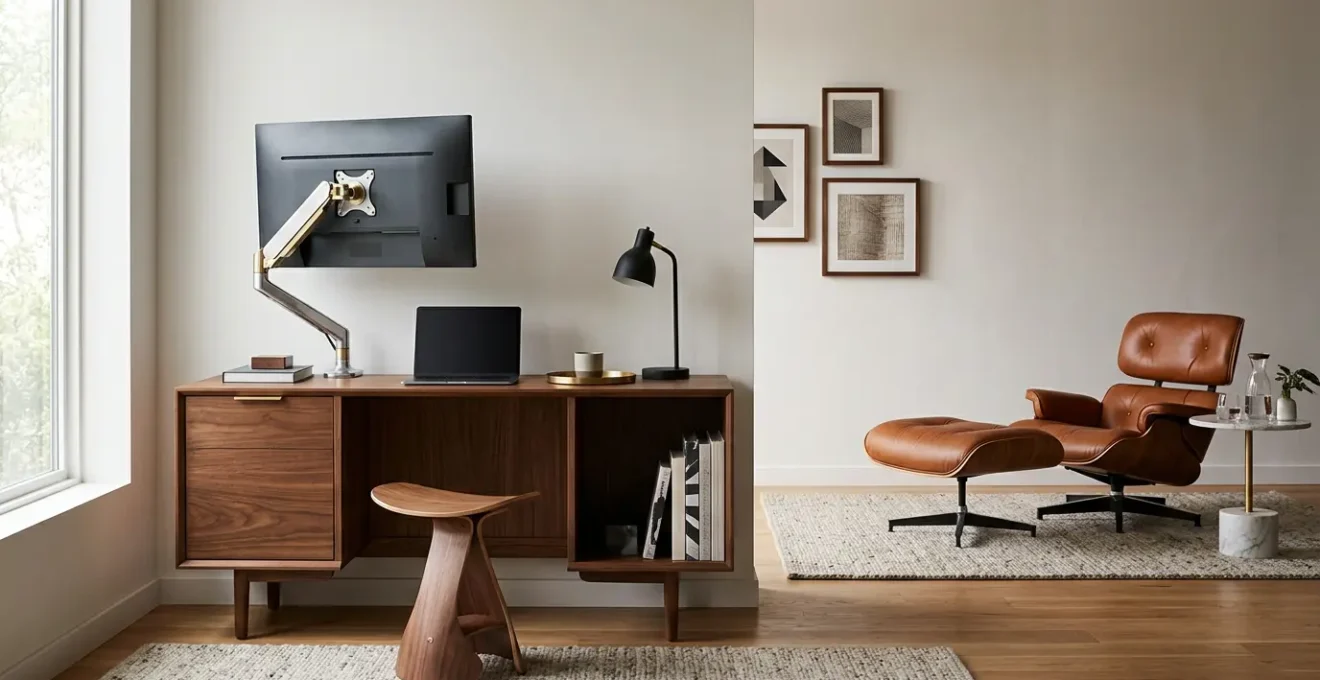
In summary:
- Your living room’s beauty shouldn’t be compromised by clunky office equipment; the solution is « stealth ergonomics. »
- Focus on adapting existing furniture with hidden supports and selecting dual-purpose pieces that transform for work and revert for leisure.
- Eliminate visual clutter by meticulously matching hardware finishes and implementing advanced cable and peripheral concealment strategies.
- Prioritize biomechanical health by understanding how improper setups, like working from a coffee table, actively harm your body.
The modern professional’s dilemma is a clash of worlds within four walls. You’ve invested time and resources curating a high-end living room—a sanctuary of taste, texture, and tranquility. Yet, the encroachment of work demands a functional space, often materializing as a black plastic office chair and a tangle of cables that feel like a violation of your home’s aesthetic integrity. This jarring contrast between a sophisticated living area and a makeshift, unaesthetic workspace is a source of daily friction for the design-conscious.
The common advice—get a laptop stand, create a « work zone »—often fails to grasp the core issue. It suggests compromise, forcing you to carve out a piece of your sanctuary and surrender it to corporate functionality. These solutions treat the problem as one of logistics, not design. They ignore the fact that for you, the form is as important as the function. The goal isn’t just to work from home; it’s to live beautifully while doing so, without your workspace screaming for attention.
But what if the solution wasn’t about adding office furniture, but about embedding ergonomic principles invisibly into your existing design? This is the philosophy of stealth ergonomics. It’s an approach that prioritizes your health and productivity without sacrificing a single inch of style. It’s about understanding the biomechanics of sitting, the subtleties of hardware finishes, and the art of concealment. This guide will walk you through the principles of transforming your living room into a high-performance, ergonomic workspace that remains, above all, your beautiful home.
This article provides a structured approach to achieving this seamless integration. We will explore everything from the hidden dangers of common furniture to the specific techniques for concealing technology, giving you a complete blueprint for your own stealth workstation.
Summary: A Designer’s Guide to Seamless Workspace Integration
- Why Dining Room Chairs Destroy Your Pelvic Tilt Within 45 Minutes?
- Which Hides Better in a Mid-Century Lounge Between Ergonomic Stools and Posture Cushions?
- How to Match Monitor Arms to Your Existing Hardware Finishes Flawlessly
- The Coffee Table Desk Trap That Compresses Your Lungs and Restricts Breathing
- How to Stow Away a Dual-Monitor Setup Completely in Under 60 Seconds
- How to Configure a Wall-to-Wall Storage Unit That Doesn’t Damage Plasterwork
- How to Hide Bulky Peripherals and Cables to Maintain an Executive Aesthetic
- How to Design an Ergonomic Executive Home Office That Commands Respect on Video Calls
Why Dining Room Chairs Destroy Your Pelvic Tilt Within 45 Minutes?
The elegant dining chair, a cornerstone of many living spaces, is an ergonomic imposter. Designed for the limited duration of a meal, its structure is fundamentally at odds with the demands of an eight-hour workday. The primary issue lies in its flat, unsupportive seat pan, which initiates a cascade of biomechanical sabotage. Within the first hour of sitting, this design encourages your pelvis to rotate backward into a position known as posterior pelvic tilt. This single postural shift is the root cause of immense discomfort.
When your pelvis tilts backward, it flattens the natural lordotic curve of your lower back. This forces the vertebral discs in your lumbar spine to bear an uneven load, leading to strain, stiffness, and chronic lower back pain. Furthermore, this slouching posture causes your head to jut forward to compensate, straining your neck and shoulder muscles. The problem is widespread; research published in Computers shows that less than 25% of individuals maintain the recommended posture and knee angles during seated work, a habit that dining chairs actively promote.

As the visualization above demonstrates, the pressure points are all wrong. Instead of distributing weight through your « sits bones » (ischial tuberosities) with a supported spine, a dining chair forces your sacrum and tailbone to carry the load. This not only creates direct discomfort but also restricts blood flow. The illusion of a proper work chair fades quickly, replaced by the reality of a device actively deconstructing your posture. Understanding this mechanism is the first step toward finding a solution that supports your body without compromising your design.
Which Hides Better in a Mid-Century Lounge Between Ergonomic Stools and Posture Cushions?
Once you accept that the dining chair is not an option for work, the challenge becomes finding a replacement that respects your aesthetic—particularly in a style as distinctive as Mid-Century Modern. The two most viable « stealth » options are high-design ergonomic stools and discreet posture cushions. The choice depends entirely on your priority: pure invisibility or a blend of form and function.
A posture cushion is the master of disguise. A well-chosen cushion, upholstered in a period-appropriate fabric like boucle, textured linen, or top-grain leather, can live on your existing dining or accent chair. Its job is to provide a sculpted wedge that tilts your pelvis forward, restoring your lumbar curve. When work is done, it doesn’t need to be hidden; it simply looks like a decorative cushion. However, its effectiveness is limited. It can only correct the seat angle; it does nothing to provide back support, armrests, or height adjustability.
An ergonomic stool, by contrast, is a more committed solution. Think of designs like the HÅG Capisco or a simple active sitting stool with a wooden base. These pieces are explicitly ergonomic, encouraging movement and core engagement. While they can’t be disguised, they can be chosen to complement the Mid-Century aesthetic. Look for stools with organic curves, tapered wooden legs, or minimal metal frames in matte black or chrome. When the workday is over, a stool can be easily slid under a desk or repurposed as a sculptural accent piece in a corner. It offers superior ergonomic benefit to a cushion but requires a higher level of design integration to feel intentional rather than intrusive.
How to Match Monitor Arms to Your Existing Hardware Finishes Flawlessly
A floating monitor is the epitome of a clean, executive workspace. However, a generic silver or black monitor arm can instantly shatter the illusion in a carefully designed room. The secret to seamless integration is hardware unification—the meticulous matching of the arm’s finish to your room’s existing metal accents. Whether your aesthetic leans on brushed brass cabinet pulls, matte black light fixtures, or polished nickel details, the monitor arm must become part of that family.
The process begins with an audit of your current hardware. Identify the dominant metal finish and texture in your living space. Is it warm (brass, bronze) or cool (chrome, stainless steel)? Is the finish polished, brushed, or matte? Once you’ve defined your target, your search for a monitor arm becomes much more specific. Premium manufacturers often offer custom finishes, but this can be costly. A more practical approach is to look for arms with clean lines and simple forms that can be professionally finished.
Powder coating is a durable and effective method for matching solid colors, especially for matte black or white finishes. For metallic looks like brass or bronze, electroplating is the superior option, providing an authentic metallic sheen. Don’t be afraid to contact local metal finishing shops with a sample of your existing hardware (like a drawer pull) to get a precise match. The small investment to custom-finish your monitor arm pays huge dividends in aesthetic cohesion, transforming a piece of office equipment into a deliberate, integrated design element.
The Coffee Table Desk Trap That Compresses Your Lungs and Restricts Breathing
Working from the sofa with a laptop on the coffee table feels relaxed and informal, but it is one of the most detrimental postures for your long-term health. This position creates the « coffee table desk trap, » a postural disaster that forces your entire upper body to hunch forward and collapse inward. The most insidious consequence of this posture is not just back or neck pain, but the severe compression of your thoracic cavity, which directly impacts your breathing.
When you lean forward from the couch, your shoulders round, your head drops, and your diaphragm—the primary muscle responsible for breathing—is unable to contract fully. This physical constraint limits your ability to take deep, full breaths. Instead, you are forced into a pattern of rapid, shallow chest breathing. Crucially, respiratory health research demonstrates that this forward head posture and rounded shoulders cause chest muscles to tighten, further restricting the rib cage’s ability to expand. This chronic oxygen deprivation can lead to fatigue, reduced concentration, and increased stress levels throughout the day.

The feeling of being « stuck » or « unproductive » while working from the couch is not just mental; it’s physiological. Your body is being starved of the oxygen it needs for optimal cognitive function. Escaping this trap requires elevating your workspace to a proper height, whether through a convertible coffee table that rises to desk height or by abandoning the sofa entirely for a more structured, albeit hidden, workstation. Recognizing that your posture directly dictates your breathing capacity is key to understanding why this seemingly comfortable setup is so harmful.
How to Stow Away a Dual-Monitor Setup Completely in Under 60 Seconds
A dual-monitor setup is a productivity powerhouse, but it’s also a significant visual imposition on a living room. The ultimate goal of stealth ergonomics is to make this entire apparatus vanish when the workday ends. Achieving a sub-60-second takedown is entirely possible with the right combination of hardware and built-in storage.
The key technology is a monitor arm equipped with a quick-release VESA mount. Standard VESA mounts require you to screw the monitor onto the arm’s plate, making removal a tedious chore. A quick-release system, however, features a lever or button that allows you to detach the monitor from the arm instantly and without tools. This single feature is the linchpin of a rapid stow-away system.
Once the monitors are detached, they need a designated, easily accessible hiding place. This is where thoughtful furniture selection comes in. A deep credenza, a wall-to-wall media unit, or even a large sideboard situated near your workspace is ideal. The process is simple and elegant:
- Depress the quick-release lever on each monitor arm and lift the screens off.
- Slide the monitors into pre-measured, felt-lined vertical slots inside the adjacent cabinet. These custom slots prevent scratches and keep the screens secure.
- Fold the empty monitor arms back against the wall or desk, where their unified hardware finish allows them to blend in.
- The entire transformation, from a full-featured workstation to a clean, uncluttered living space, can be completed in less time than it takes to make a cup of coffee.
This system provides the full ergonomic and productivity benefits of a dual-monitor setup without the permanent aesthetic compromise.
How to Configure a Wall-to-Wall Storage Unit That Doesn’t Damage Plasterwork
Wall-to-wall storage is the ultimate ally in creating a stealth workspace. It provides the volume needed to conceal monitors, printers, files, and an entire fold-down desk surface. However, for those in rental properties or historic homes with delicate plaster, the thought of drilling into walls is a non-starter. Fortunately, several sophisticated solutions offer floor-to-ceiling storage without a single screw.
The most elegant option is a high-end freestanding modular system. Brands like USM Haller or Vitsoe’s 606 Universal Shelving System are designed with this in mind. These systems are built on a structural frame that stands independently on the floor. They are incredibly stable and can be configured to your exact specifications, incorporating cabinets, drawers, and open shelving. While a significant investment, they are pieces of furniture in their own right, holding their value and moving with you from home to home.
A second, highly effective method is the tension pole system. These systems use floor-to-ceiling poles that are held in place by pressure, creating a sturdy vertical framework. Shelves and cabinets are then attached to these poles. This offers immense flexibility in configuration and placement and leaves absolutely no mark on the walls or ceiling. When selecting a tension-based unit, prioritize those made from high-quality materials with robust and reliable tensioning mechanisms to ensure stability. This approach provides the visual impact and storage capacity of a built-in unit with the damage-free advantage of freestanding furniture.
Key takeaways
- True ergonomics is about creating postural support, not just buying a specific type of chair. It can be achieved with discreet, design-led solutions.
- Effective stealth design is an active process of concealment. Technology and work tools should be stored out of sight when not in use.
- Seamless integration is in the details. Unifying the finishes of functional hardware (like monitor arms) with your existing decor is non-negotiable.
How to Hide Bulky Peripherals and Cables to Maintain an Executive Aesthetic
An executive aesthetic is defined by control, clarity, and an absence of clutter. In a home office context, nothing destroys this image faster than a « rat’s nest » of cables and a collection of bulky peripherals strewn across a surface. Given that recent research on digital device usage reveals the average person accumulates 6 hours and 37 minutes of screen time daily, our tech is a near-constant presence. Taming it is essential for maintaining a serene and professional environment.
The first principle is centralization. A single, well-hidden Thunderbolt 4 or USB-C dock is your most powerful weapon. This one device can handle power delivery to your laptop, a dual-monitor output, Ethernet, and multiple USB accessories. By connecting everything to the dock, which can be mounted underneath your desk or hidden inside a cabinet, you reduce the number of cables running to your laptop to a single, elegant cord. This immediately declutters your primary worksurface.
Next, you must manage the remaining cables with precision. Integrated cable channels within a monitor arm are a must. For cables running from the wall or floor, avoid cheap plastic solutions. Instead, opt for fabric cable sleeves that match your wall or furniture color, or use high-end adhesive cable clips to run wires along the unseen edges of desk legs or baseboards. Finally, bulky peripherals like printers or external hard drives should be housed within a cabinet or credenza, ensuring adequate ventilation to prevent overheating. An executive workspace isn’t about having no technology; it’s about having technology that is completely under your control.
Your 5-Step Audit for an Executive Aesthetic
- Identify Contact Points: Methodically list every visible cable, charger, and peripheral in your workspace. Note their start and end points to map the visual clutter.
- Inventory Current Solutions: Assess your existing cable management. Are you using basic plastic ties, or have you considered integrated channels and fabric sleeves?
- Evaluate Aesthetic Coherence: Compare your visible tech (cables, docks, arms) to your desired executive aesthetic. Does a black plastic dock clash with your walnut desk? Does a white power strip stand out against a dark floor?
- Analyze Centralization Potential: Determine if a single docking station could replace multiple chargers and dongles. The goal is to reduce the number of visible connections to the absolute minimum.
- Create an Integration Plan: Prioritize the changes. Start with the biggest impact: hiding a dock. Then, route monitor cables through the arm. Finally, plan ventilated storage for bulky items like printers.
How to Design an Ergonomic Executive Home Office That Commands Respect on Video Calls
In the age of remote work, your home office is your personal brand headquarters, and your video call background is your digital handshake. Designing a space that commands respect is a delicate balance of projecting authority and maintaining ergonomic integrity. The goal is a workspace that looks impressive on camera while supporting your body off-camera. This is critical, as ergonomics research from the University of Pittsburgh indicates that at least one-third of workers report musculoskeletal issues even in conventional office settings; improvised home setups are far riskier.
Your on-camera presence starts with the background. A cluttered or overly personal background can be distracting and unprofessional. An executive background is controlled and intentional. This can be a well-styled bookshelf, a piece of large-scale art, or a simple, textured wall. The key is depth and thoughtful curation. Avoid sitting directly against a wall, as this creates a flat, uninteresting image. Create layers to add visual interest and professionalism.
Lighting is paramount. Never use a window as your direct background, as you will be backlit into a silhouette. Your primary light source should be in front of you, ideally a large, soft light like a ring light or a softbox, positioned slightly above eye level to create a flattering and professional look. Finally, your posture on camera speaks volumes. An ergonomic setup that keeps your monitor at eye level ensures you are looking directly into the camera, not down at your laptop. This posture, with relaxed shoulders and a straight back, projects confidence and engagement, completing the image of an executive in full command of their domain.
By applying these principles of stealth ergonomics, you can finally resolve the conflict between your professional needs and your personal aesthetic. The next step is to begin auditing your own space, identifying the small changes that will yield the greatest impact. Evaluate your seating, plan your cable routes, and design a workspace that serves your career without sacrificing the beauty of your home.